Outputs and Visualization
After the execution of the surfatt_tomo, the outputs of the tomography are stored in the directory that is specified in the input parameter file. The outputs include the following files:
Output files
Required outputs
-
final_model.h5: The final model file that contains the S-wave velocity model with following attributes:vs: S-wave velocity model in km/s, with the shape of(nx, ny, nz)x: Longitude of the model in degree with the shape of(nx)y: Latitude of the model in degree with the shape of(ny)z: Depth of the model in km with the shape of(nz)
-
objective_function.txt: The objective function value of each iteration during the inversion process. The columns are:- Iteration number
- Misfit value of each iteration
- Mean value of traveltime residual for phase velocity data
- Standard deviation of traveltime residual for phase velocity data
- Mean value of traveltime residual for group velocity data
- Standard deviation of traveltime residual for group velocity data
- Step length of each iteration
Optional outputs (output_in_process_model is True)
model_iter.h5: The model file of each iteration during the inversion process. The file contains the attributes:model_vs_{xxx}: S-wave velocity model of iteration{xxx}in km/s, with the shape of(nx, ny, nz)gradient_vs_{xxx}: Preconditioned gradient of iteration{xxx}, with the shape of(nx, ny, nz)
Optional outputs (output_in_process_data is True)
src_rec_file_{ph}_forward.csv: The forward simulated travel-time data file of phase{ph}
writing this src_rec file is time-consuming and memory-consuming, so it is recommended to set output_in_process_data to False for large-scale inversion.
Visualization
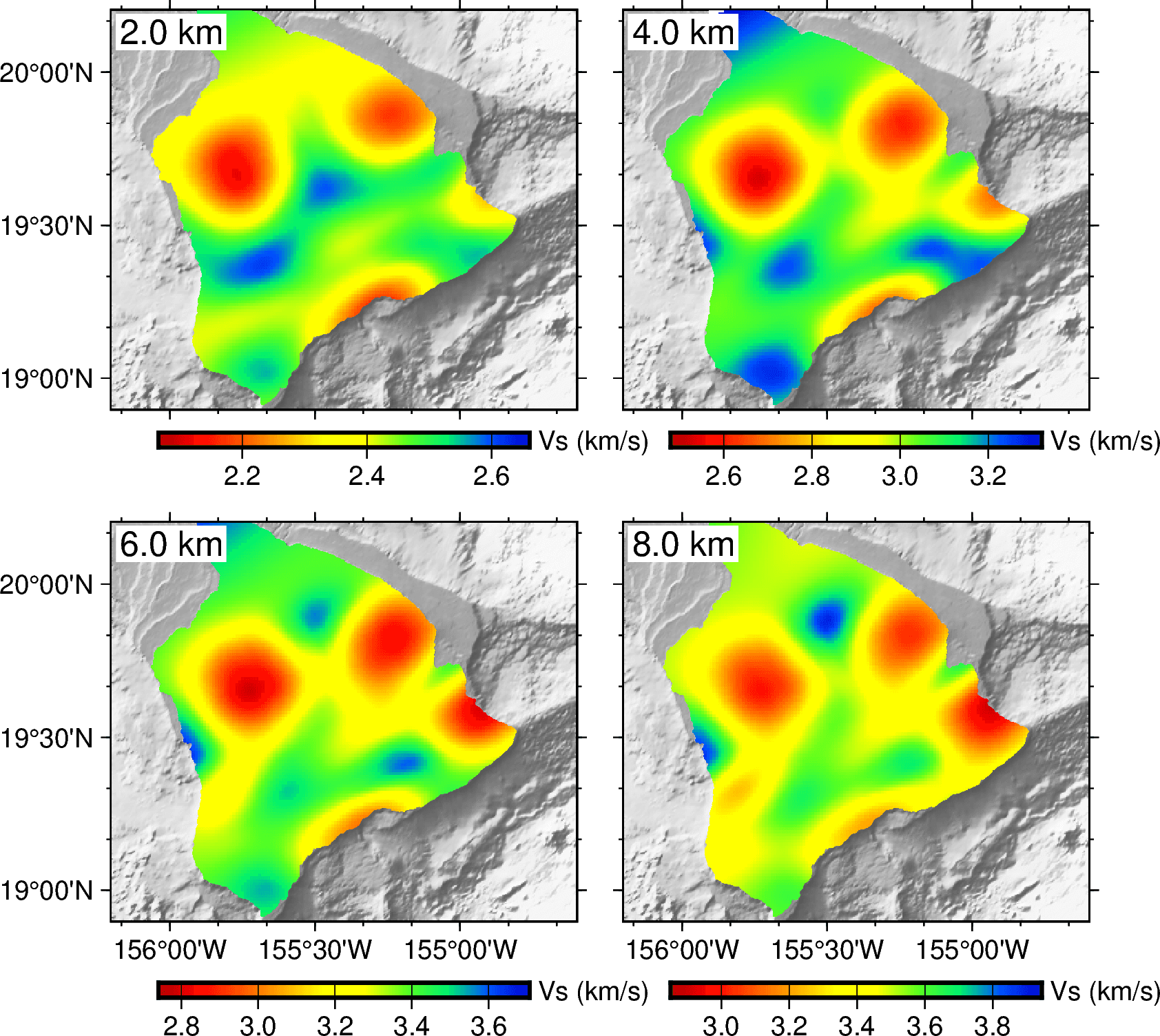
we recommend using the PyGMT package to visualize the outputs of the tomography. Please refer to examples/xxxx/plot_model.ipynb for examples to visualize the final model.
Rotate the model back to the original coordinate system
If the topography, the sources, and the receivers are rotated before the inversion, you can use the surfatt_rotate_model command to rotate the model back to the original coordinate system. The command is called as follows:
Usage: surfatt_rotate_model -i model_file -a angle -c clat/clon -o out_model_file [-h]

 Rotate model by a given angle (anti-clockwise) and convert to csv format. If angle and center location are not provided, the model will be converted to csv format directly without rotation

 required arguments:
  -i model_file        Path to model file in netcdf format
  -o out_file          Output file name

 optional arguments:
  -a angle             Angle in degree to rotate model
  -c clat/clon         Center of rotation in latitude and longitude
  -h                   Print help message
For the Hawaii example, we can rotate the final model back to the original coordinate system using the following command:
angle_back=30
pos_str=19.5/-155.5

surfatt_rotate_model -i OUTPUT_FILES/final_model.h5 -a $angle_back -c $pos_str -o OUTPUT_FILES/final_model.csv
The rotated model is stored in the final_model.csv file with 4 columns: lat, lon, depth, and vs.
The following is an example script to visualize the final model by reading this final_model.csv:
import pygmt
import numpy as np
import pandas as pd

# Load the final model
fm_tab = pd.read_csv("./OUTPUT_FILES/final_model.csv")
z = np.unique(fm_tab["dep"].values)

# Plot the final model
fig = pygmt.Figure()
region=[-156.2, -154.6, 18.9, 20.2]
dep = [2, 4, 6, 8]
pygmt.config(MAP_FRAME_TYPE="plain")
with fig.subplot(nrows=2, ncols=2, figsize=("12c", "12c"), sharex='b', sharey='l', frame=["af", "WSne"]):
    for i, depth in enumerate(dep):
        close_dep = z[np.abs(z-depth).argmin()]
        data = fm_tab[fm_tab["dep"]==close_dep]
        fig.basemap(region=region, projection="M?", panel=i)
        grid = pygmt.grdcut("@earth_relief_15s", region=region)
        pygmt.makecpt(cmap="gray", series=[-6000, 9000, 10], reverse=True)
        fig.grdimage(grid, region=region, projection="M?", cmap=True, shading=True)
        grid = pygmt.surface(x=data['lon'], y=data['lat'], z=data['vs'], region=region, spacing="0.01" )
        vmax = data['vs'].max()+0.05; vmin = data['vs'].min()-0.05
        pygmt.makecpt(cmap="seis", series=[vmin, vmax])
        fig.coast(area_thresh=10, resolution='f', land=True)
        fig.grdimage(grid=grid, cmap=True)
        fig.coast(Q=True)
        fig.text(text=f'{close_dep} km', position='TL', justify='TL', offset='0.1c/-0.1c', fill='white', font='12p')
        fig.colorbar(frame=['a0.2g0.2', 'y+l"Vs (km/s)"'])
fig.show()